Section Colors
Color utility functions.
Summary
| Return type | Function and summary |
|---|---|
| string, string, int | ChooseColor(string object, table suggestedColors, selected) Ask the user to choose one color in a menu. |
| boolean | CropSurface(Surface surface, int red, int green, int blue, int opacity, string operand, boolean left, boolean top, boolean right, boolean bottom) Crop a Surface for a given color. |
| int | color_brightness(int red, int green, int blue, int opacity) Get the brightness of a color A brightness between 0 and 127 is considered as dark, a brightness between 127 and 255 is considered as bright. |
Functions
ChooseColor(string object, table suggestedColors, selected)
Ask the user to choose one color in a menu.
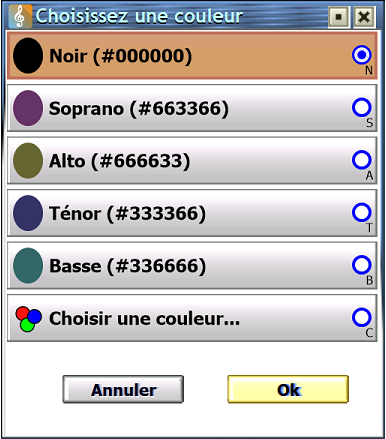
"Staff background").
Then, a list of suggested colors (e.g. found in score).
Then, the ability to pick a new color from the Color Picker, and save it to favorites for faster use next times.
| Parameter | Type | Default | Description |
|---|---|---|---|
| object | string | The name you want, e.g. "Staff background", "Staff lines"... | |
| suggestedColors | table | nil | A table of string in [#]RRGGBB format (recommanded), or number color index |
| selected | A string in [#]RRGGBB format or number color index |
- Returns
- string: Choosen color, in RRGGBB format, or
nilif user canceled the choice. - string: Choosen color, in #RRGGBB format, or
nilif user canceled the choice. - int: Color index, or nearest in 256 colors palette, or
nilif user canceled the choice.
color_brightness(int red, int green, int blue, int opacity)
Get the brightness of a color A brightness between 0 and 127 is considered as dark, a brightness between 127 and 255 is considered as bright.
Without opacity, the formula is brightness = 0.2126*red + 0.7152*green + 0.0722*blue
| Parameter | Type | Default | Description |
|---|---|---|---|
| red | int | red | |
| green | int | green | |
| blue | int | blue | |
| opacity | int | 255 |
- Return
- int: brightness value, between 0 and 255
CropSurface(Surface surface, int red, int green, int blue, int opacity, string operand, boolean left, boolean top, boolean right, boolean bottom)
Crop a Surface for a given color.
For example, CropSurface(mySurface, 255, 255, 255, 255) crops surface to remove white areas on 4 sides of a drawn image/text/staff.
| Parameter | Type | Default | Description |
|---|---|---|---|
| surface | Surface | The surface to crop | |
| red | int | Red value from 0 to 255 | |
| green | int | Green value from 0 to 255 | |
| blue | int | Blue value from 0 to 255 | |
| opacity | int | 255 | Opacity value from 0 to 255 |
| operand | string | "==" | Operand for color to crop:
|
| left | boolean | true | Crop left side |
| top | boolean | true | Crop top side |
| right | boolean | true | Crop right side |
| bottom | boolean | true | Crop bottom side |
- Return
- boolean: true if crop was needed and succeed, return by
Surface.Crop(...)MyrScript function.